Challenge and Context
The core organizational challenge was the impending failure of Honeywell’s legacy software, Safety Suite, which served as the fleet management backbone for portable and fixed gas detectors across high-risk industries (e.g., Oil & Gas, Chemicals). This software suffered from a critical usability deficit, posing a significant risk to customer safety and market share:
• Prohibitive Setup Times: Connecting devices like the MultiRAE to Safety Suite often took over three hours across multiple days due to complex instructions, undocumented issues (like needing an antiquated RS232 adapter cable), and over 30 confusing steps.
• Connectivity and Data Integrity: Customers experienced frequent failures in Bluetooth (BLE) pairing with mobile apps (Safety Communicator), data inconsistency due to time synchronization errors between devices and docks, and slow data downloading (30-60 minutes for historical logs).
• Lack of Proactive Insight: The existing software lacked true analytics, preventing customers from gaining visibility into asset status, user accountability (who missed bump tests/calibrations), and the root cause of incidents.
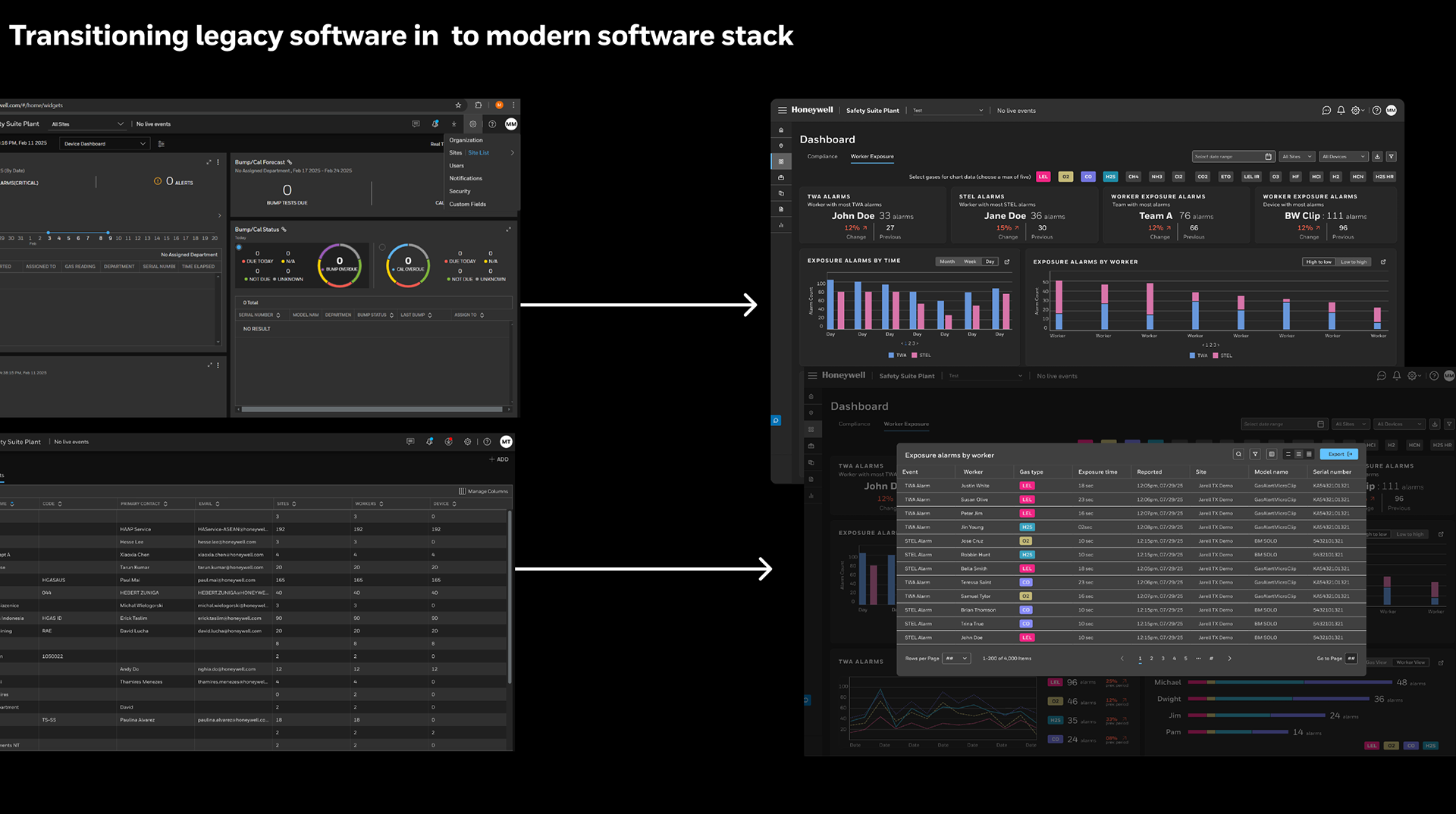
This situation demanded a complete digital transformation to create an enterprise safety ecosystem (EWAS) that prioritized user experience and technological reliability.
Design Goal and Assumptions
Transform a fragmented legacy ecosystem into an intelligent, connected experience that empowers industrial workers, safety managers, and technicians
I led the user experience strategy and design while defining the onboarding flow, AI interactions, and dashboard systems, and helping shape the integration of Honeywell Forge 2.0 across the new experience.
As Lead UX Designer I was able to spearhead transformation by designing a next-generation enterprise gas detection ecosystem (EWAS) that delivered seamless device setup, modernized fleet management, assured regulatory compliance, and laid the foundation for AI-enabled safety services.
I led the user experience strategy and design while defining the onboarding flow, AI interactions, and dashboard systems, and helping shape the integration of Honeywell Forge 2.0 across the new experience.
As Lead UX Designer I was able to spearhead transformation by designing a next-generation enterprise gas detection ecosystem (EWAS) that delivered seamless device setup, modernized fleet management, assured regulatory compliance, and laid the foundation for AI-enabled safety services.
Solve the Usability Crisis: Create intuitive and dependable mechanisms for device onboarding and synchronization (replacing the previous 30+ step failure point).
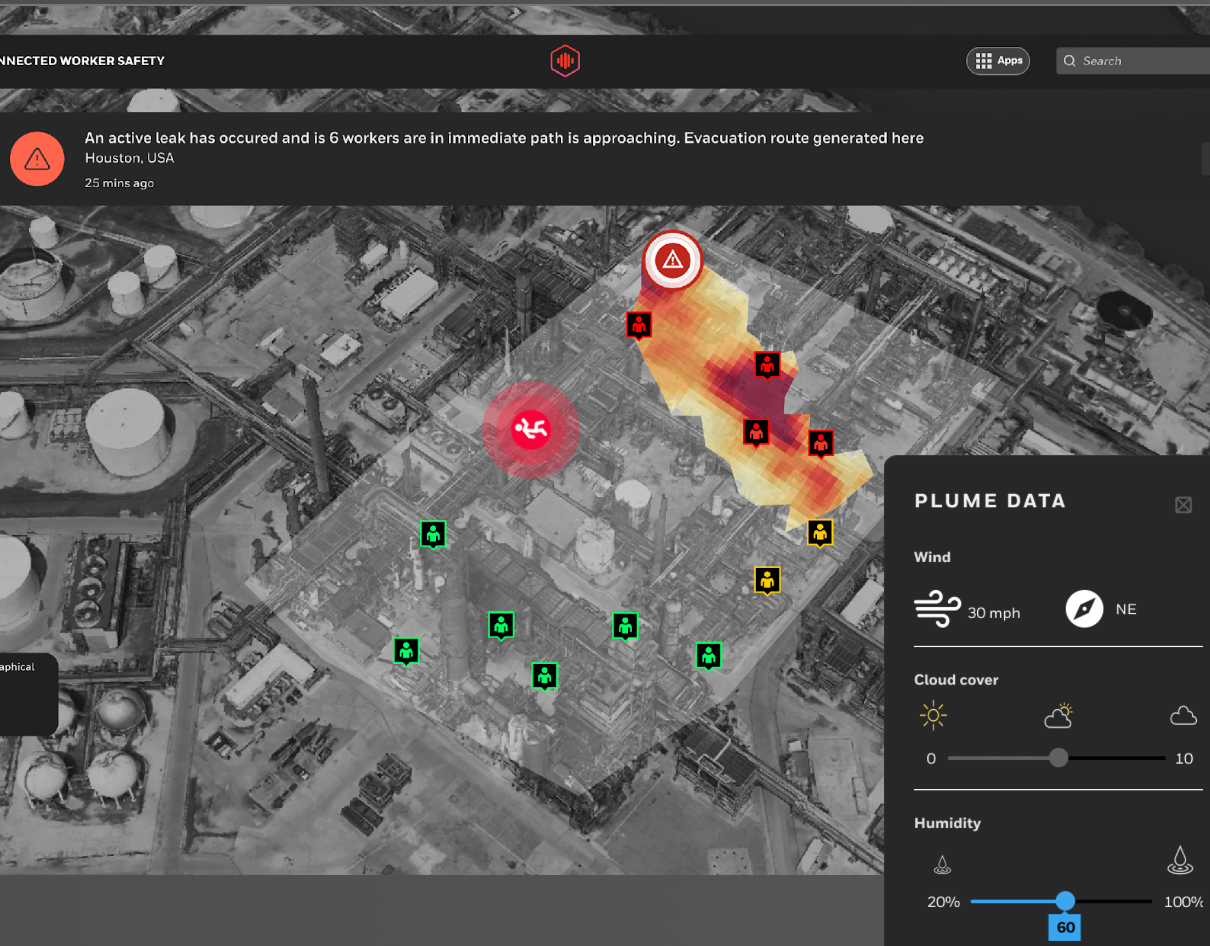
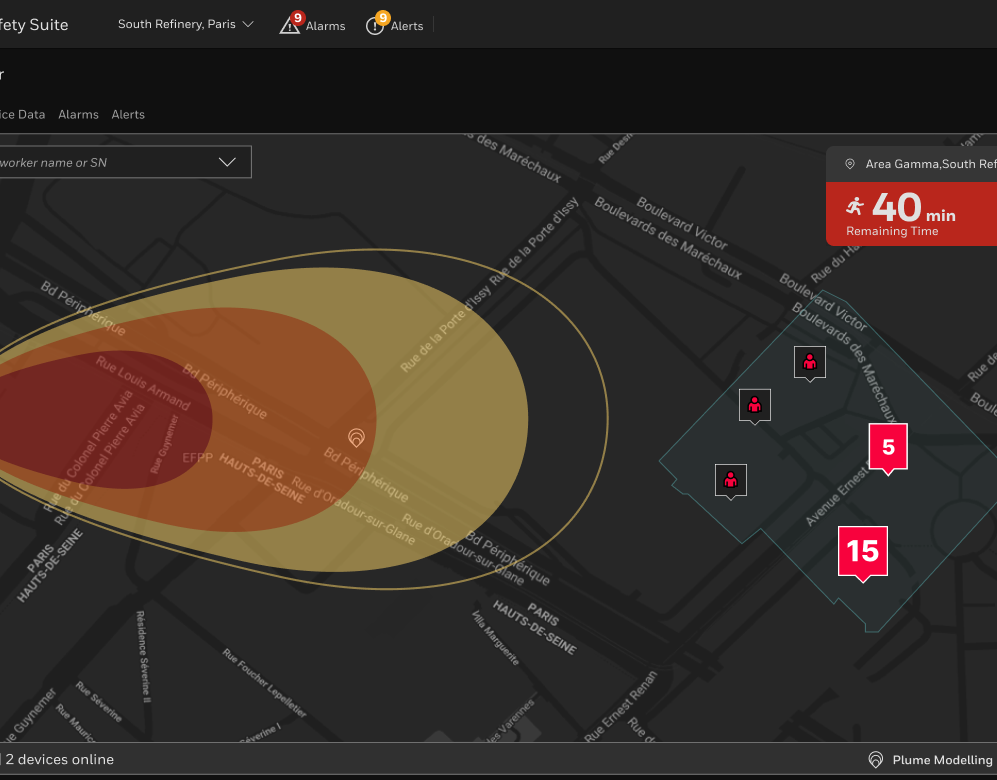
Enable Predictive Operational Intelligence: Integrate AI/ML insights into a Command-and-Control style interface to forecast compliance issues, predict leaks (gas plume modeling), and proactively suggest safer worker routes.
Ensure Best-in-class Fleet Management: Design device compliance workflows, fleet management dashboards, and audit trails to uphold worker safety outcomes, specifically addressing lone worker scenarios and emergency response readiness.
Definition - Understanding the Problem
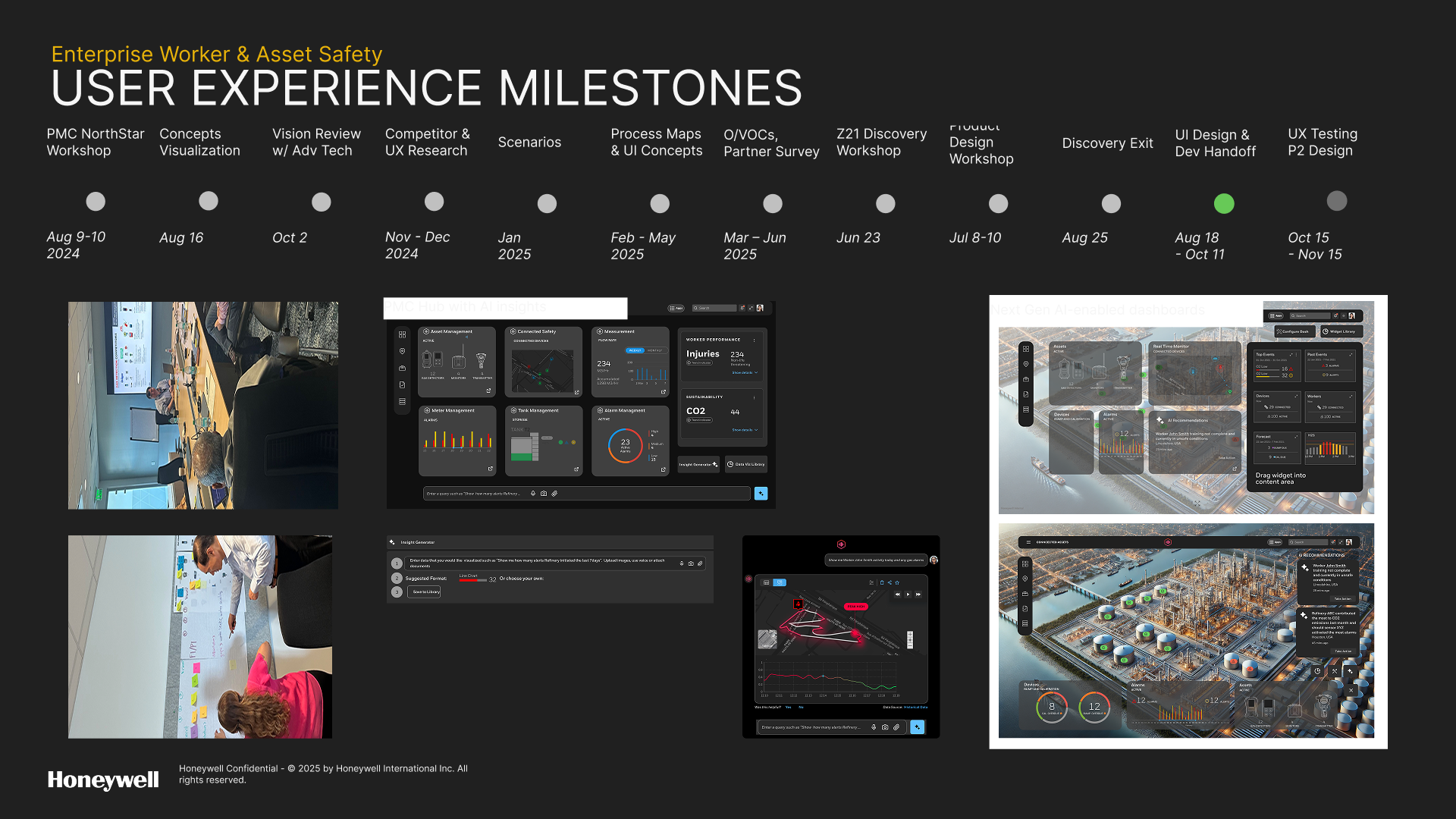
In my role as lead designer, I collaborated with the UX research lead to systematically apply human-centered design techniques including on-site workshops, stakeholder design collaborations, observational voice of customer, competitive analysis, usability testing and prototyping.
Diagnostic Research and Constraint Mapping
We conducted extensive UX domain research, mapping the existing dysfunctional workflows and performing an internal HUE information architecture test that meticulously documented the pain points of the legacy Safety Suite installation/setup process. Simultaneously, we benchmarked against top competitors (Blackline, Dräger, MSA) to define "table stakes" features like device assignment, compliance data and real-time monitoring, informing the competitive strategy for EWAS.
Current state workflows
I deconstructed Safety Suite’s existing screens and workflows.
• Device setup and configuration
• Check-in / Check-out (device assignment)
• Fleet management
• Real-time monitoring
• Safety outcomes and reporting
• Device setup and configuration
• Check-in / Check-out (device assignment)
• Fleet management
• Real-time monitoring
• Safety outcomes and reporting
This analysis revealed deeply nested flows and redundant paths as many users had to switch between desktop apps, mobile apps (Safety Communicator, Device Configurator), and docking stations just to perform simple tasks like firmware updates or alarm calibration.
Key friction points identified:
• Inconsistent BLE pairing experiences
• Confusion around gateway vs. dock vs. mobile connectivity
• Manual user-role assignments and lack of onboarding guidance
• Fragmented data between fleet health, device usage, and safety outcomes
Key friction points identified:
• Inconsistent BLE pairing experiences
• Confusion around gateway vs. dock vs. mobile connectivity
• Manual user-role assignments and lack of onboarding guidance
• Fragmented data between fleet health, device usage, and safety outcomes
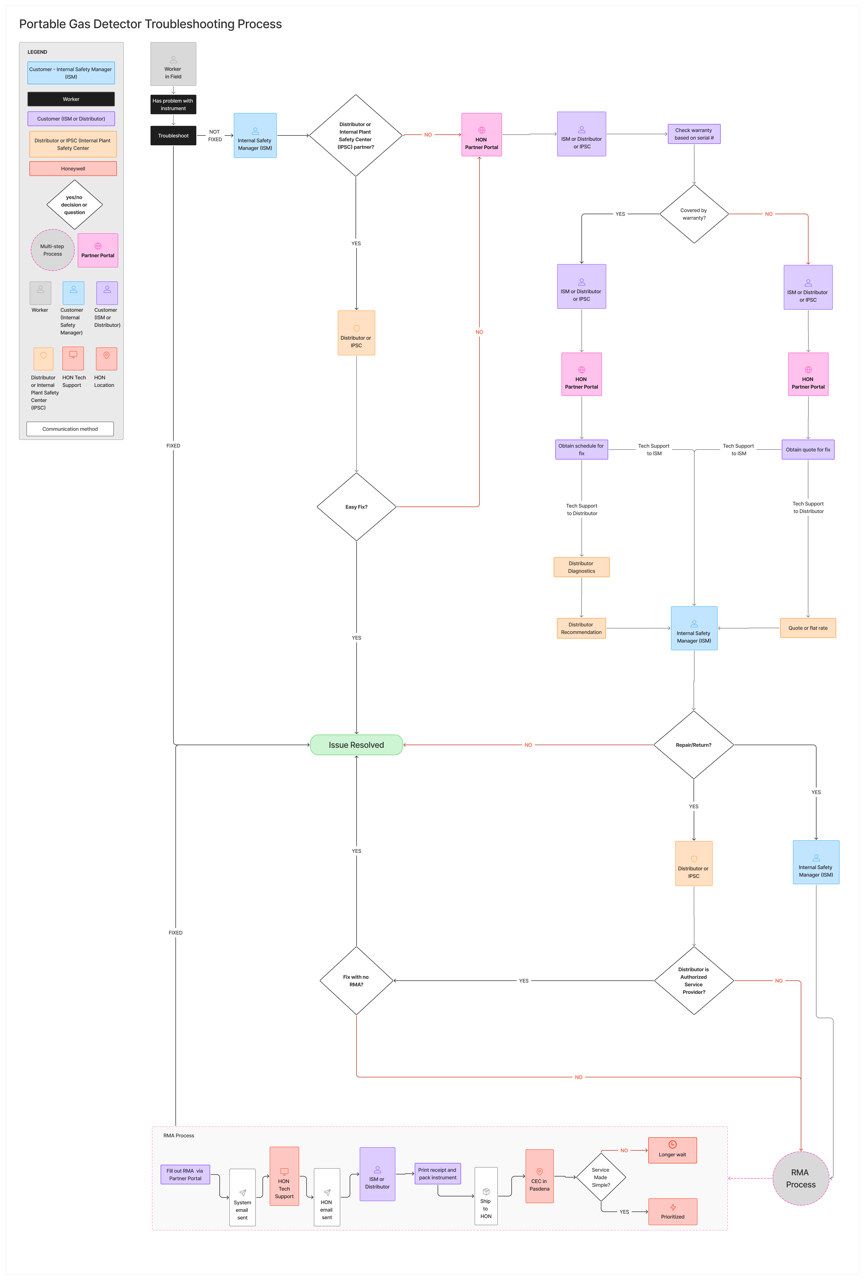
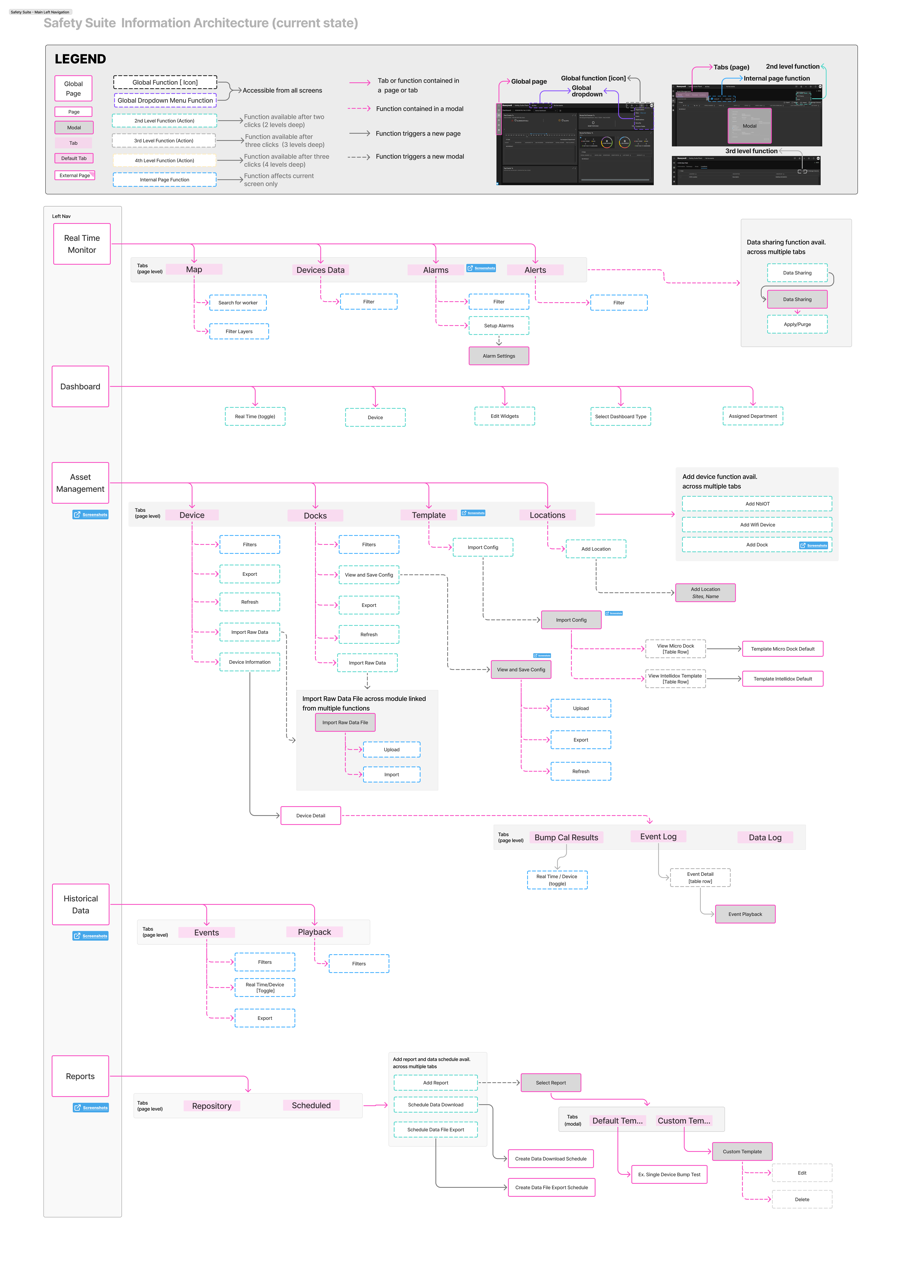
Mapping the Legacy System
Before jumping into design, I needed to fully understand how Safety Suite’s legacy experience functioned — not from documentation, but from the user’s lived perspective.
To do that, I mapped the entire Safety Suite ecosystem using a unified visual language of boxes, arrows, and a custom legend.
Each color and symbol represented a specific interaction type:
• Pages – primary views or dashboards
• Modals – secondary, task-based interactions
• Navigation paths – directional arrows showing user journeys
• Tabs – nested content areas
• Subprocesses – loops or dead-end flows where users often got stuck
Each color and symbol represented a specific interaction type:
• Pages – primary views or dashboards
• Modals – secondary, task-based interactions
• Navigation paths – directional arrows showing user journeys
• Tabs – nested content areas
• Subprocesses – loops or dead-end flows where users often got stuck
This model became a “single source of truth” for understanding how all modules connected — including Device Configurator, Fleet Manager, Real-Time Monitoring, and Safety Outcome.
Findings from the Workflow Map
• The system had overlapping entry points for similar tasks (e.g., device configuration accessible from multiple menus)
• Key workflows like “Assign Device” and “Add Site” were buried two or three layers deep, often behind modal dialogs
• The navigation hierarchy wasn’t role-based as managers, technicians, and admins viewed the same menus, creating cognitive overload
• Multiple redundant loops added unnecessary clicks and confusion
• The system had overlapping entry points for similar tasks (e.g., device configuration accessible from multiple menus)
• Key workflows like “Assign Device” and “Add Site” were buried two or three layers deep, often behind modal dialogs
• The navigation hierarchy wasn’t role-based as managers, technicians, and admins viewed the same menus, creating cognitive overload
• Multiple redundant loops added unnecessary clicks and confusion
This mapping exercise clarified why users felt lost. It wasn't because the product lacked capability, but its architecture had grown organically over time without a unified Information Architecture strategy.
Using the Map as a Design Tool
I created a clickable system map as a benchmark for simplification and as a collaboration artifact. Benefits of the map included:
• Engineering alignment on what could be consolidated under Forge 2.0
• Demonstrations during workshops to show where friction occurred
• Annotated with insights (from VOC and app store reviews) to pinpoint pain points and prioritize redesign areas
• Engineering alignment on what could be consolidated under Forge 2.0
• Demonstrations during workshops to show where friction occurred
• Annotated with insights (from VOC and app store reviews) to pinpoint pain points and prioritize redesign areas
This diagram directly informed how we structured the new EWAS navigation model by collapsing redundant pages into intuitive modules and introducing a guided setup path for first-time users.

Research - Competitive Analysis and Benchmarking Best-in-Class Safety Systems
The UX team and I compared Honeywell’s experience with leading safety platforms such as MSA Grid, Blackline Live, Dräger Gas Detection Connect, Industrial Scientific iNet, and WatchGas SST.
Each had distinct advantages:
• MSA: RFID/NFC-based digital check-in/out
• Blackline: Real-time cloud dashboards and analytics
• Dräger: Cloud-based monitoring with role-based permissions
• WatchGas: Compliance kiosks with NFC tap-to-assign simplicity
• MSA: RFID/NFC-based digital check-in/out
• Blackline: Real-time cloud dashboards and analytics
• Dräger: Cloud-based monitoring with role-based permissions
• WatchGas: Compliance kiosks with NFC tap-to-assign simplicity
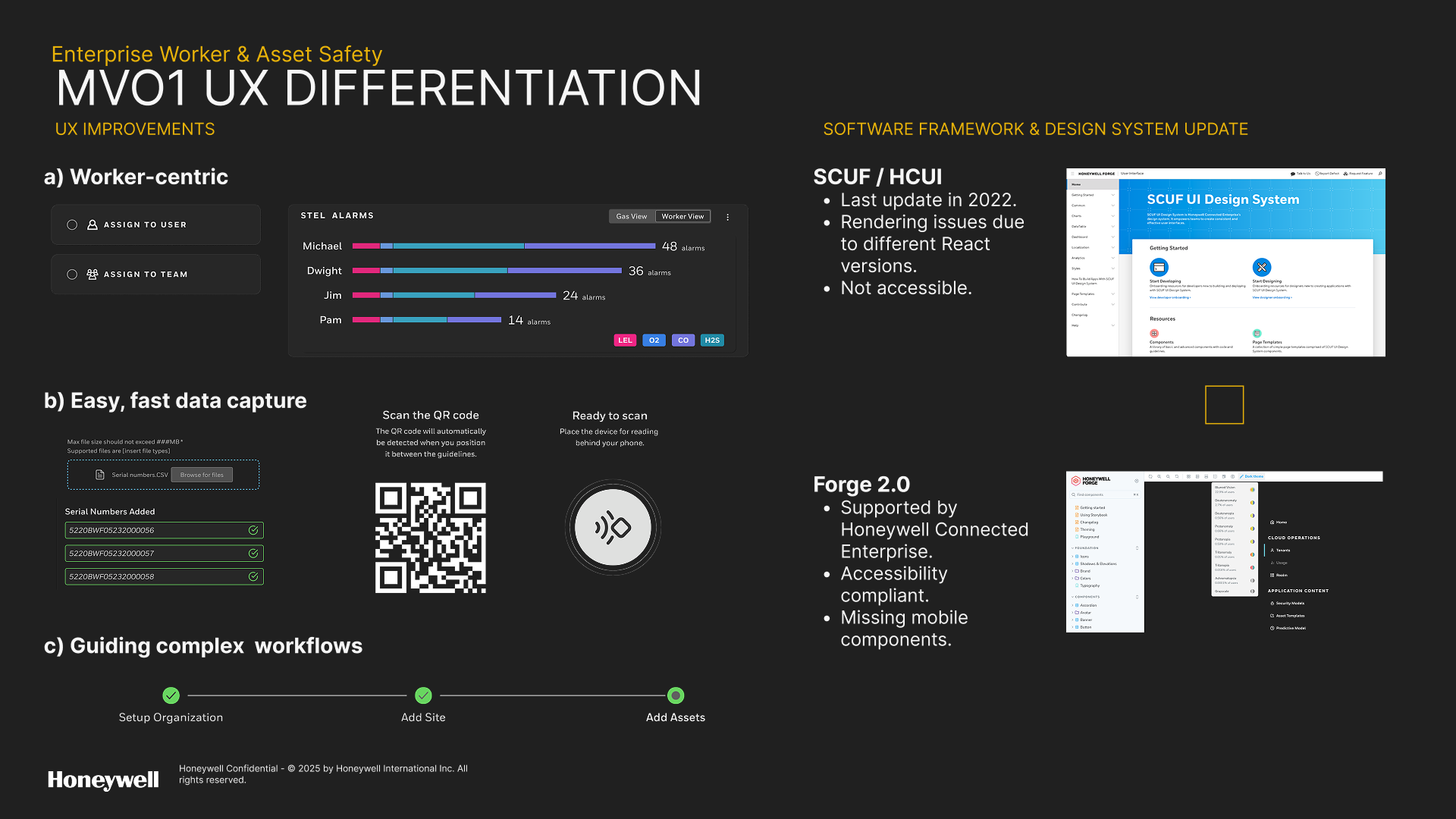
By plotting these differentiators against Honeywell’s current UX, we identified four experience gaps to address:
1. Simplified onboarding (reduce steps and technical jargon) that would be worker-centric
2. Smart device assignment (NFC/QR tap-based pairing)
3. Unified visibility (fleet + worker + compliance in one dashboard) with accessibility at the forefront
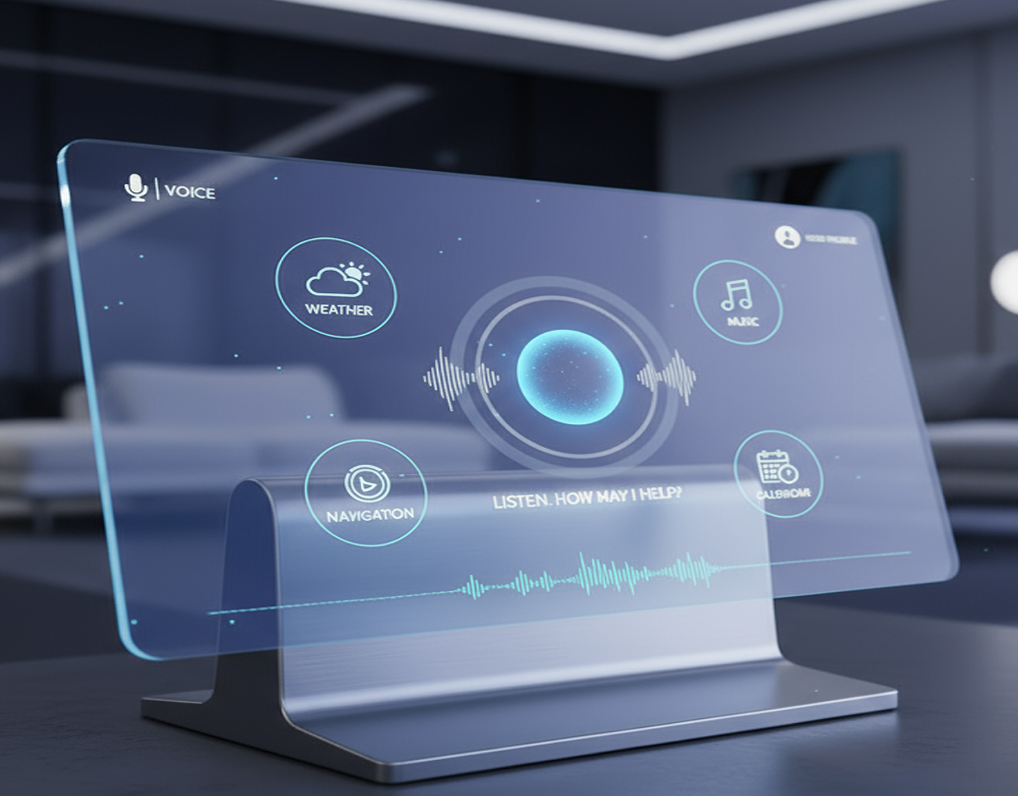
4. Guided steps through complex workflows supplemented with AI assistance (reduce dependency on support)
1. Simplified onboarding (reduce steps and technical jargon) that would be worker-centric
2. Smart device assignment (NFC/QR tap-based pairing)
3. Unified visibility (fleet + worker + compliance in one dashboard) with accessibility at the forefront
4. Guided steps through complex workflows supplemented with AI assistance (reduce dependency on support)
Discovery - Validating Pain Points with Usability Testing
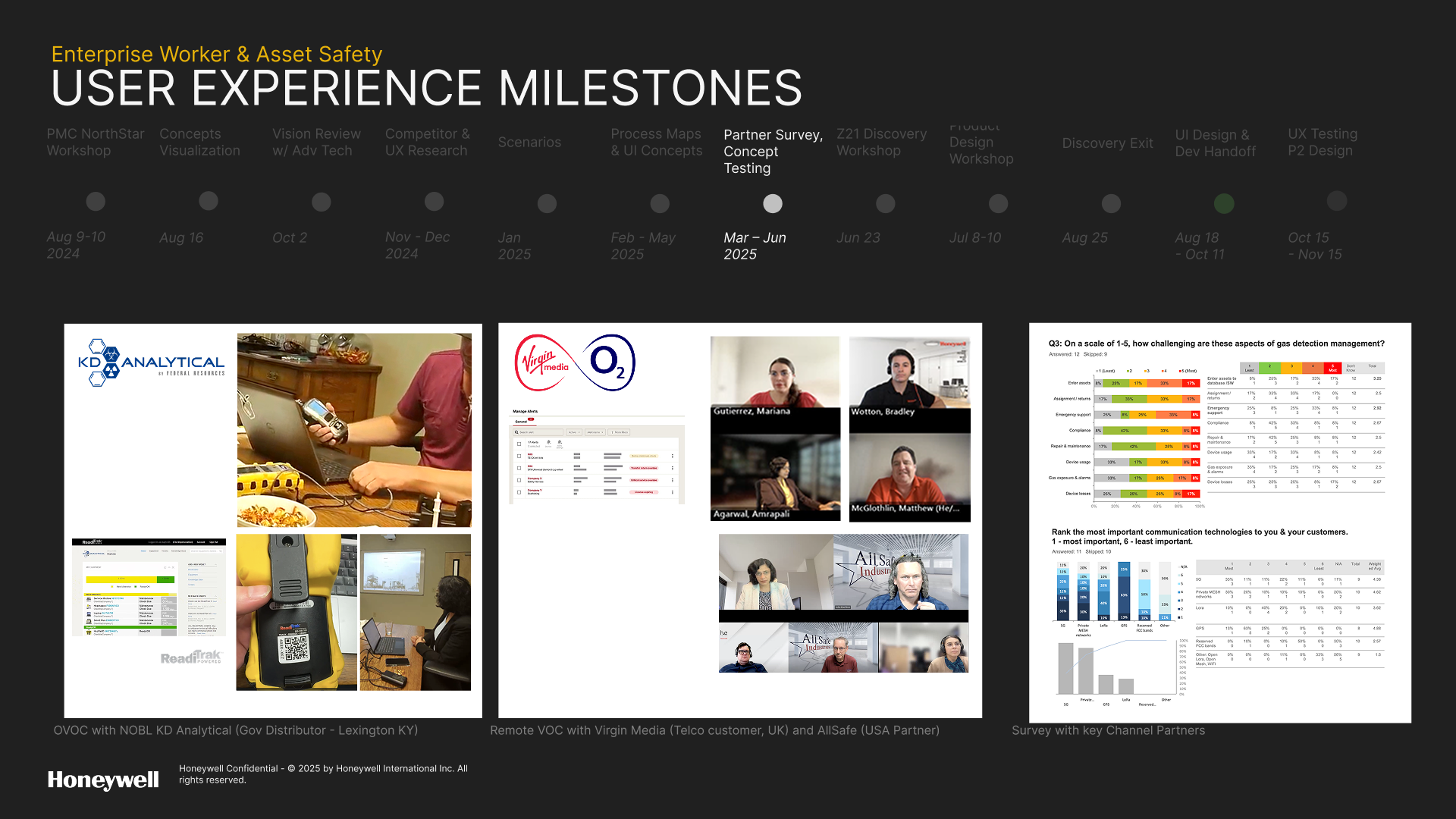
With the gaps initially identified through desktop research and competitive analysis, we conducted usability walkthroughs with field technicians, product SMEs, and support engineers using the current Safety Suite. This helped us validate initial assumptions about setup.
Sessions included real-world tasks such as:
• Connecting a BW Flex or MicroRAE via BLE
• Assigning a worker to a device
• Exporting calibration data
Field workers validated initial assumptions about onboarding and we uncovered new usability gaps based on UX principles and heuristics:
• Error handling was weak as users often abandoned the setup when pairing failed
• System feedback was unclear (“Success” messages appeared even when the connection wasn’t established)
• Navigation between modules (Config, Fleet, Outcomes) lacked hierarchy or a clear mental model
• Users expressed frustration that “I never know if I did it right”
Sessions included real-world tasks such as:
• Connecting a BW Flex or MicroRAE via BLE
• Assigning a worker to a device
• Exporting calibration data
Field workers validated initial assumptions about onboarding and we uncovered new usability gaps based on UX principles and heuristics:
• Error handling was weak as users often abandoned the setup when pairing failed
• System feedback was unclear (“Success” messages appeared even when the connection wasn’t established)
• Navigation between modules (Config, Fleet, Outcomes) lacked hierarchy or a clear mental model
• Users expressed frustration that “I never know if I did it right”
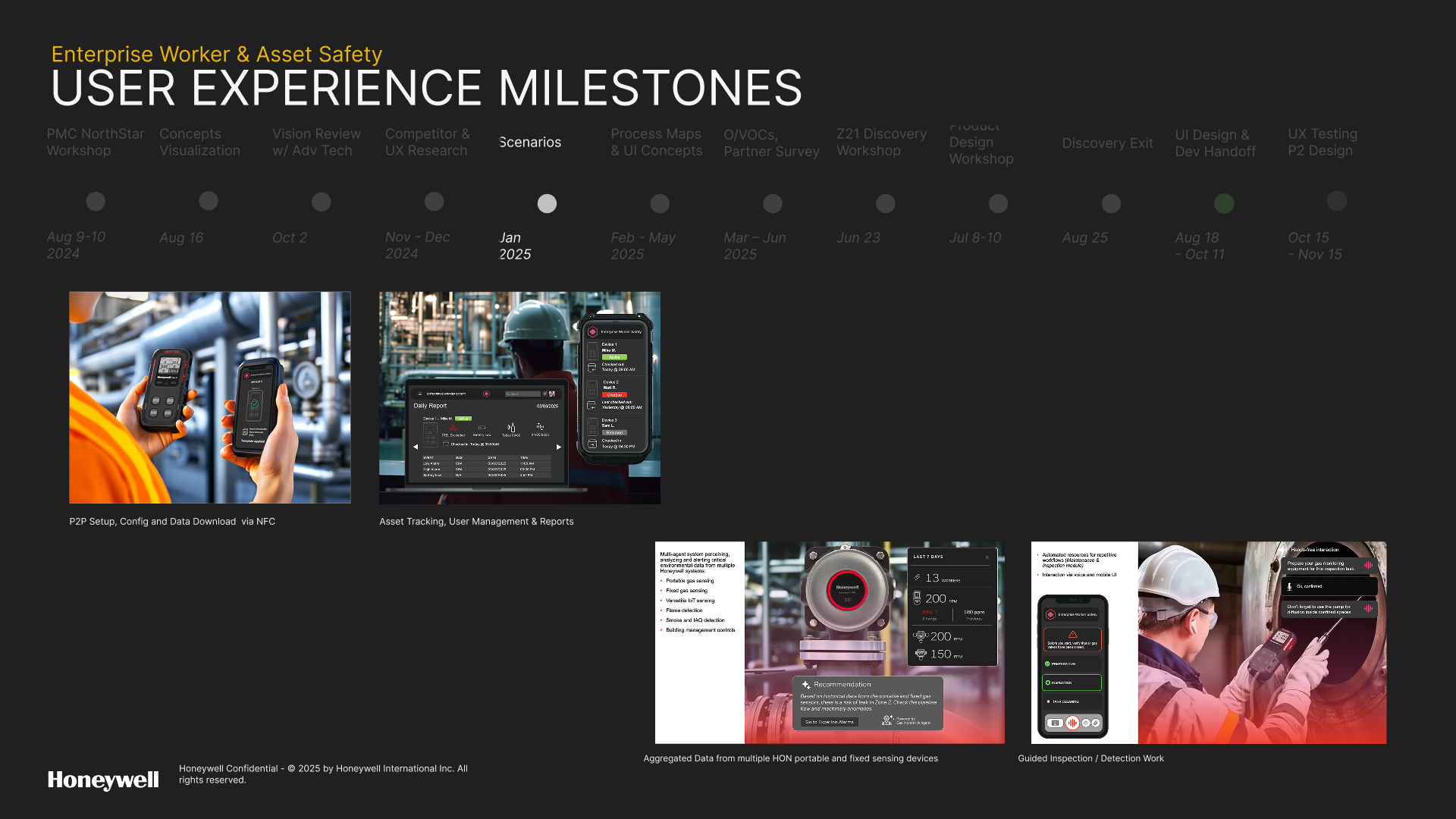
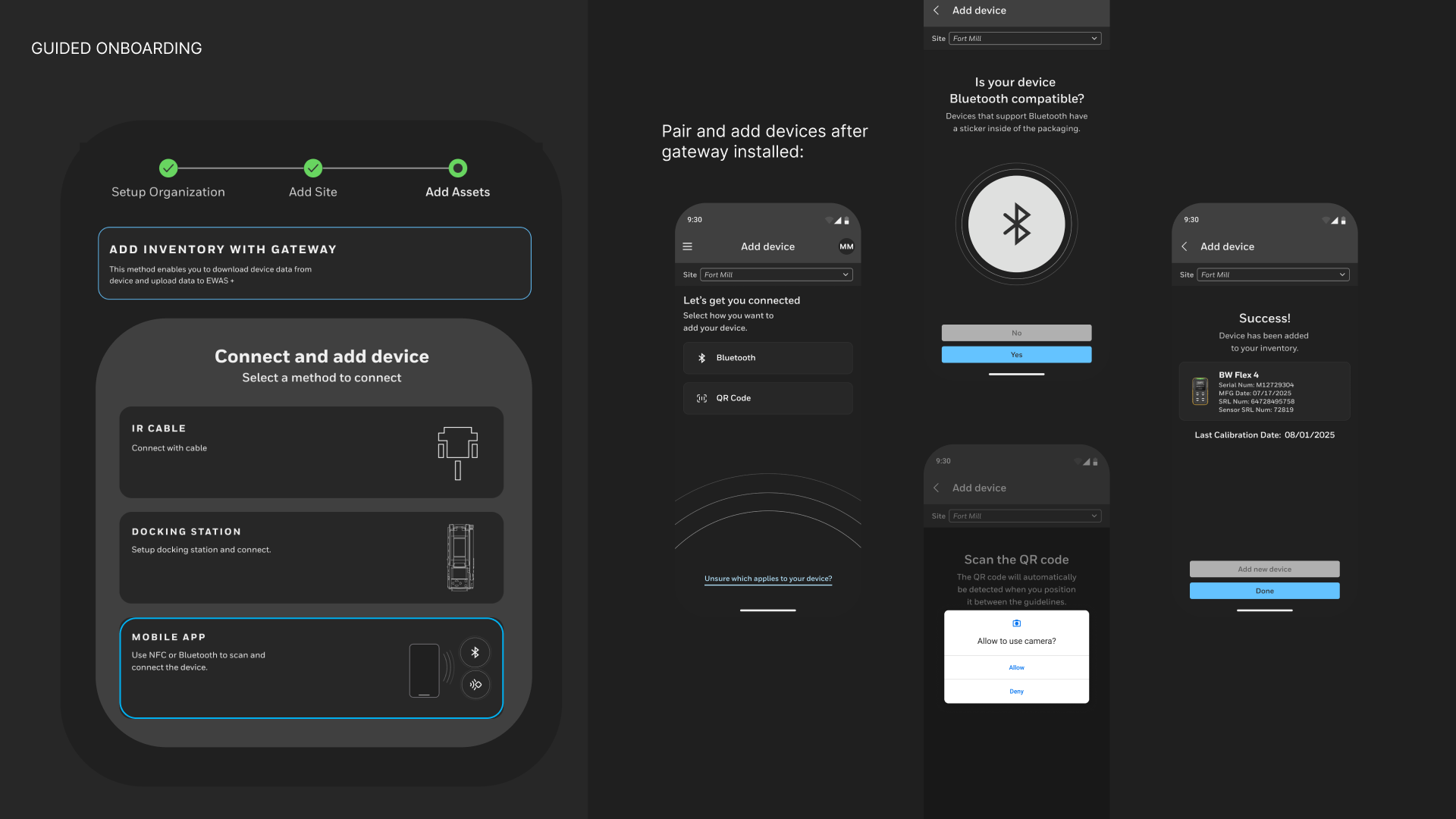
Designing the Onboarding Experience
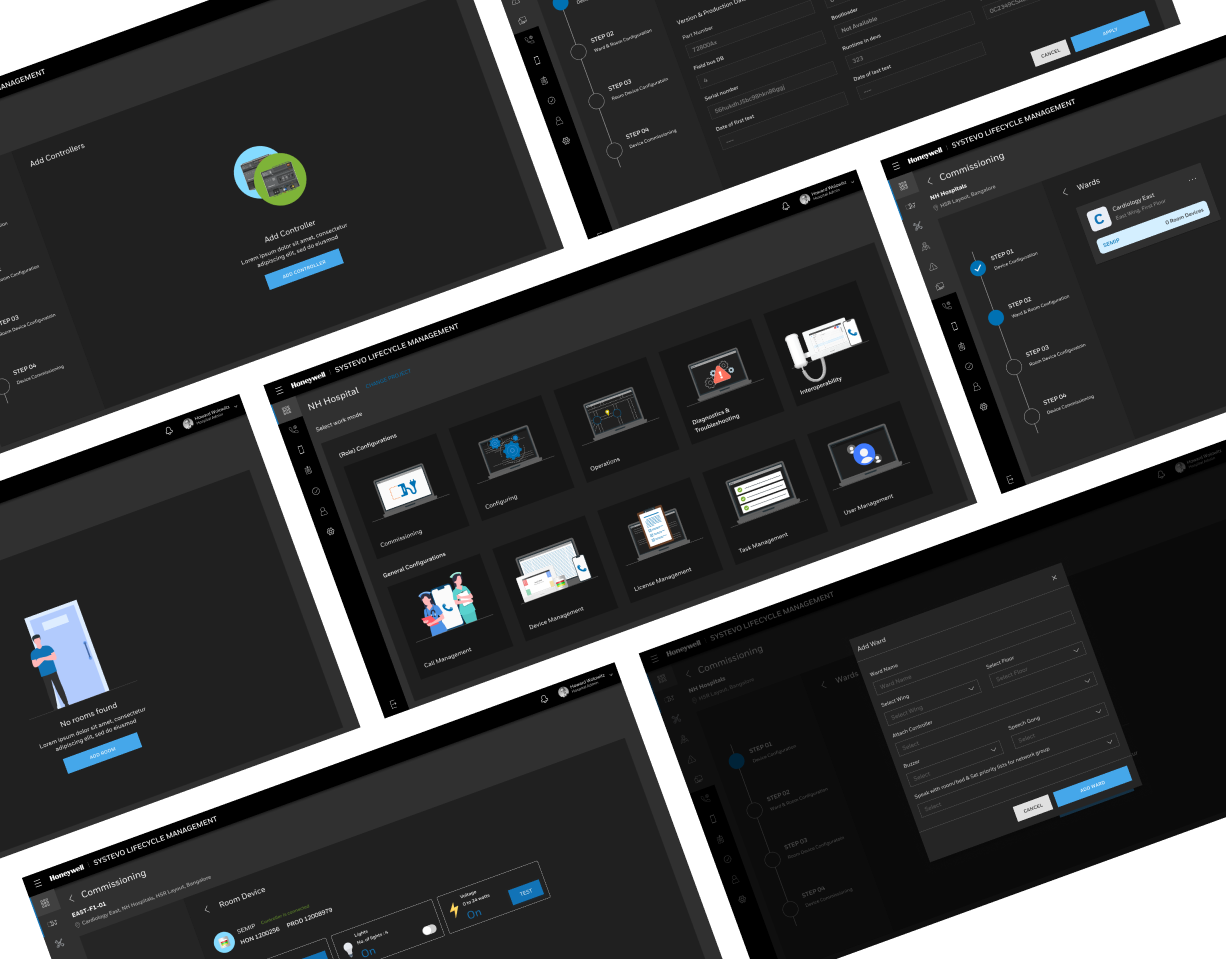
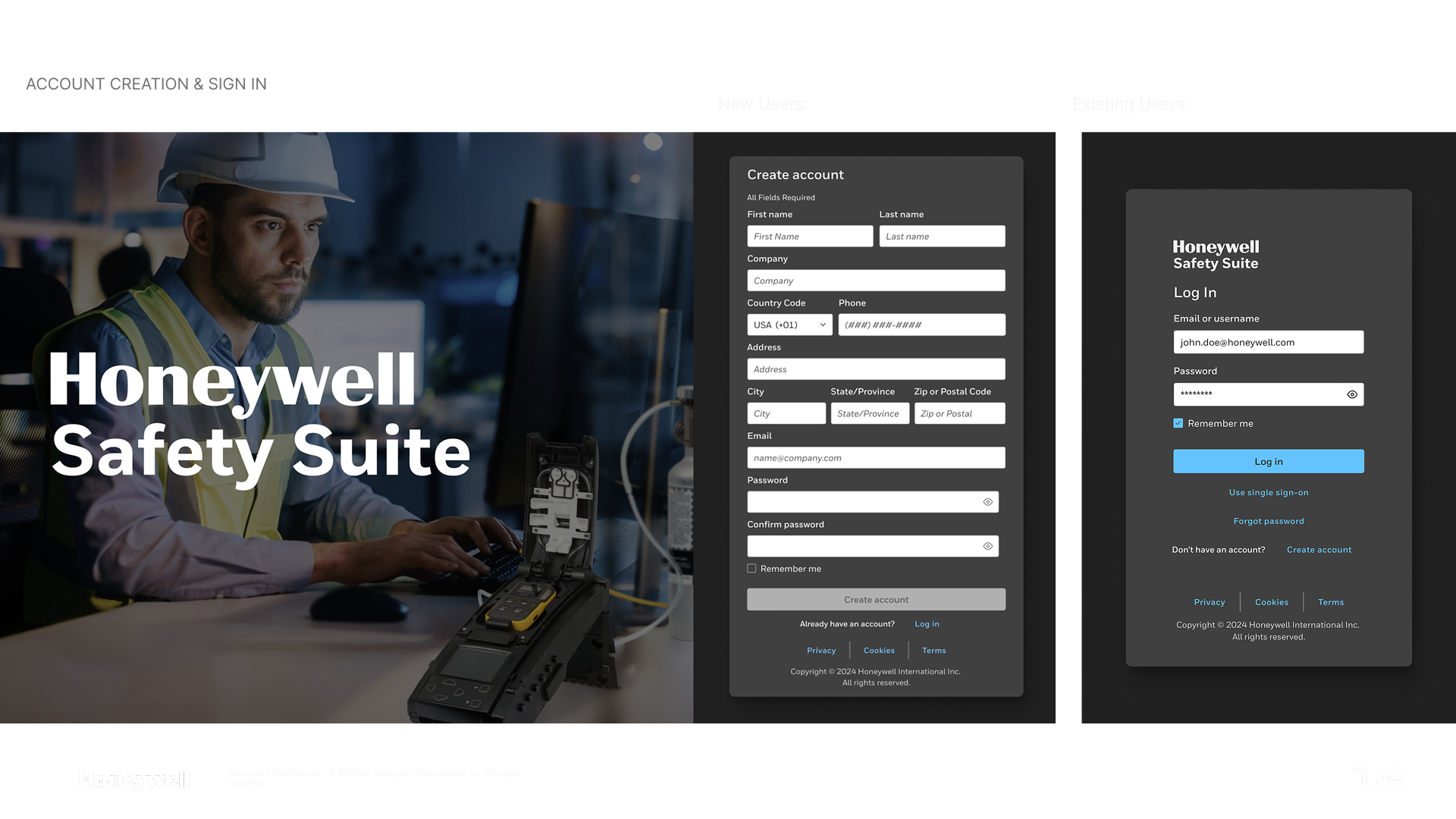
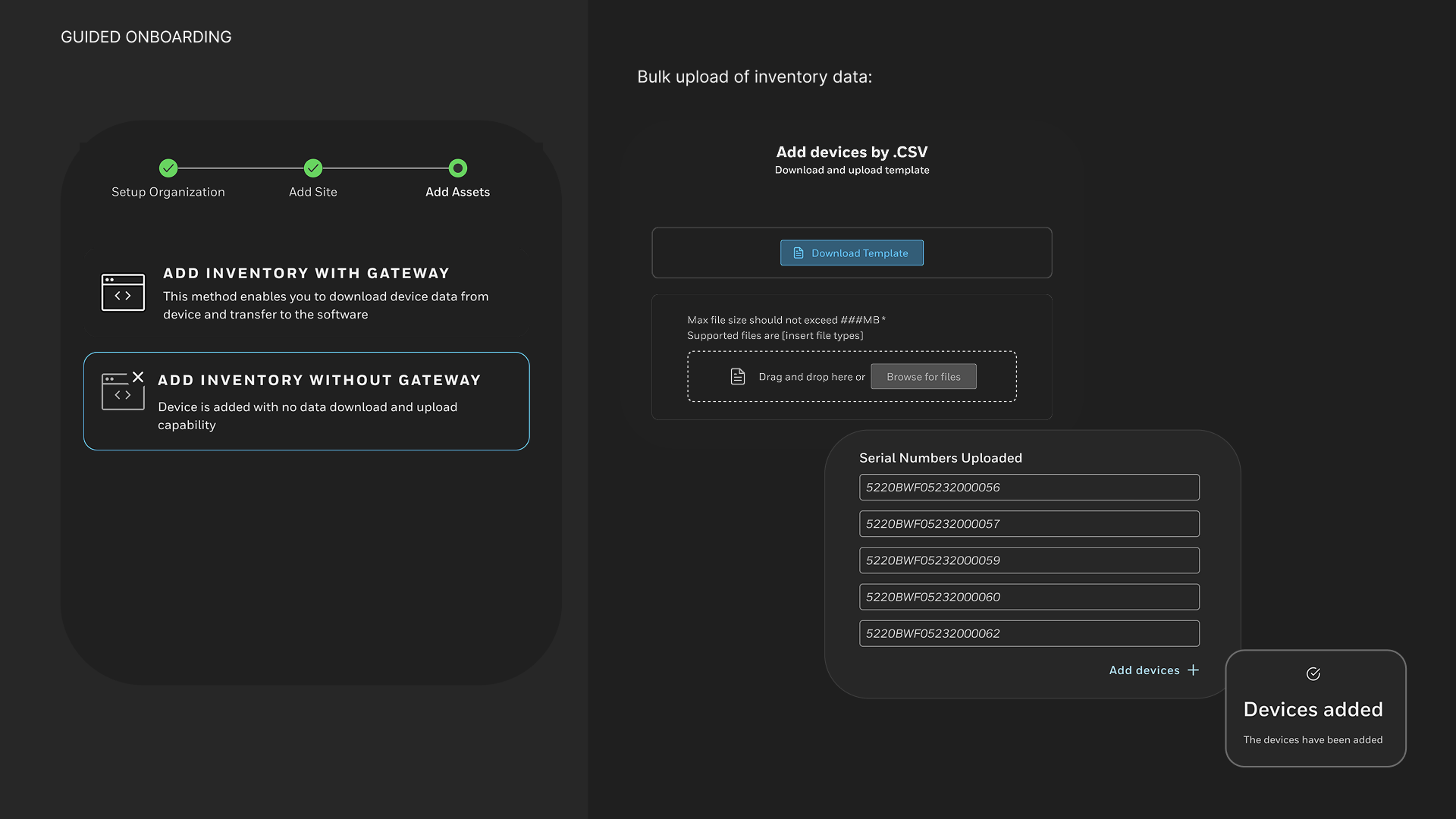
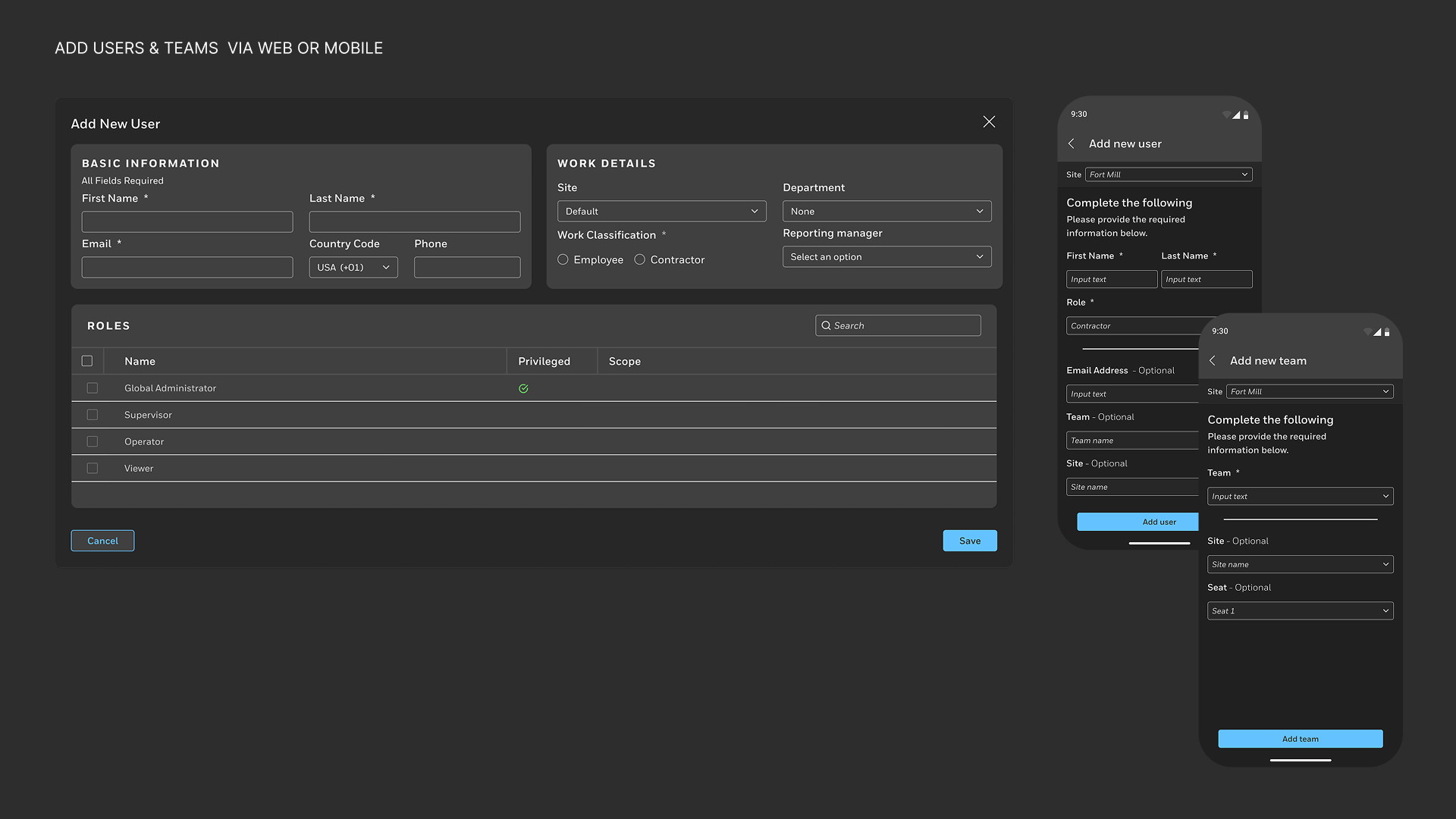
We completely reimagined how devices and users join the platform.
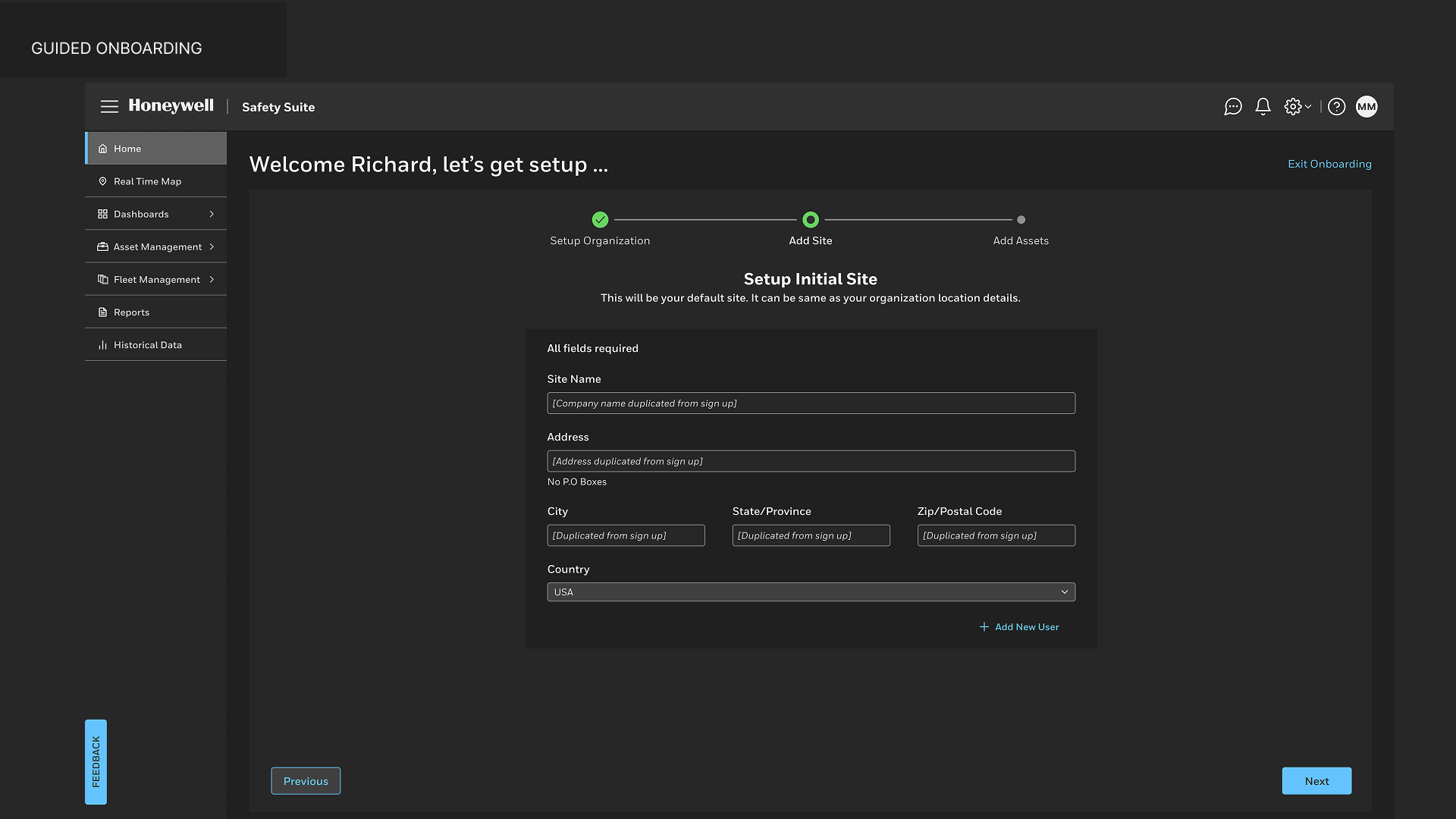
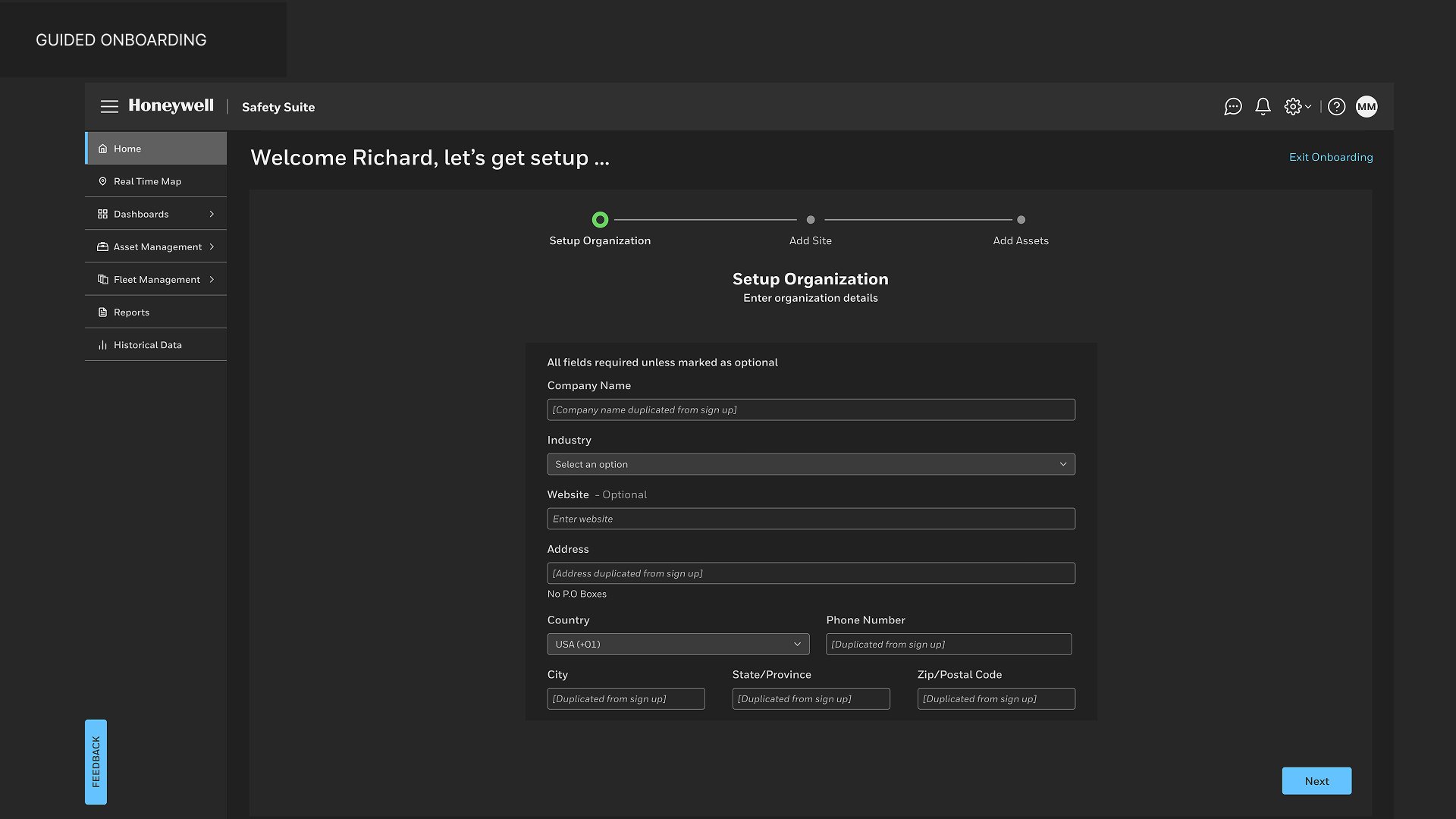
The old multi-step manual setup became a guided, adaptive onboarding journey informed by pre-qualification questions and real-time connectivity detection.
The old multi-step manual setup became a guided, adaptive onboarding journey informed by pre-qualification questions and real-time connectivity detection.
Highlights
• Pre-qualification flow: Users answer short setup questions, such as site type, worker roles, real-time needs, to generate a tailored setup sequence.
• Smart connection detection: Automatically recommends the best connection type (gateway, mobile, or wired).
• AI-guided troubleshooting: Provides instant feedback when a connection fails — suggesting likely fixes and tutorials.
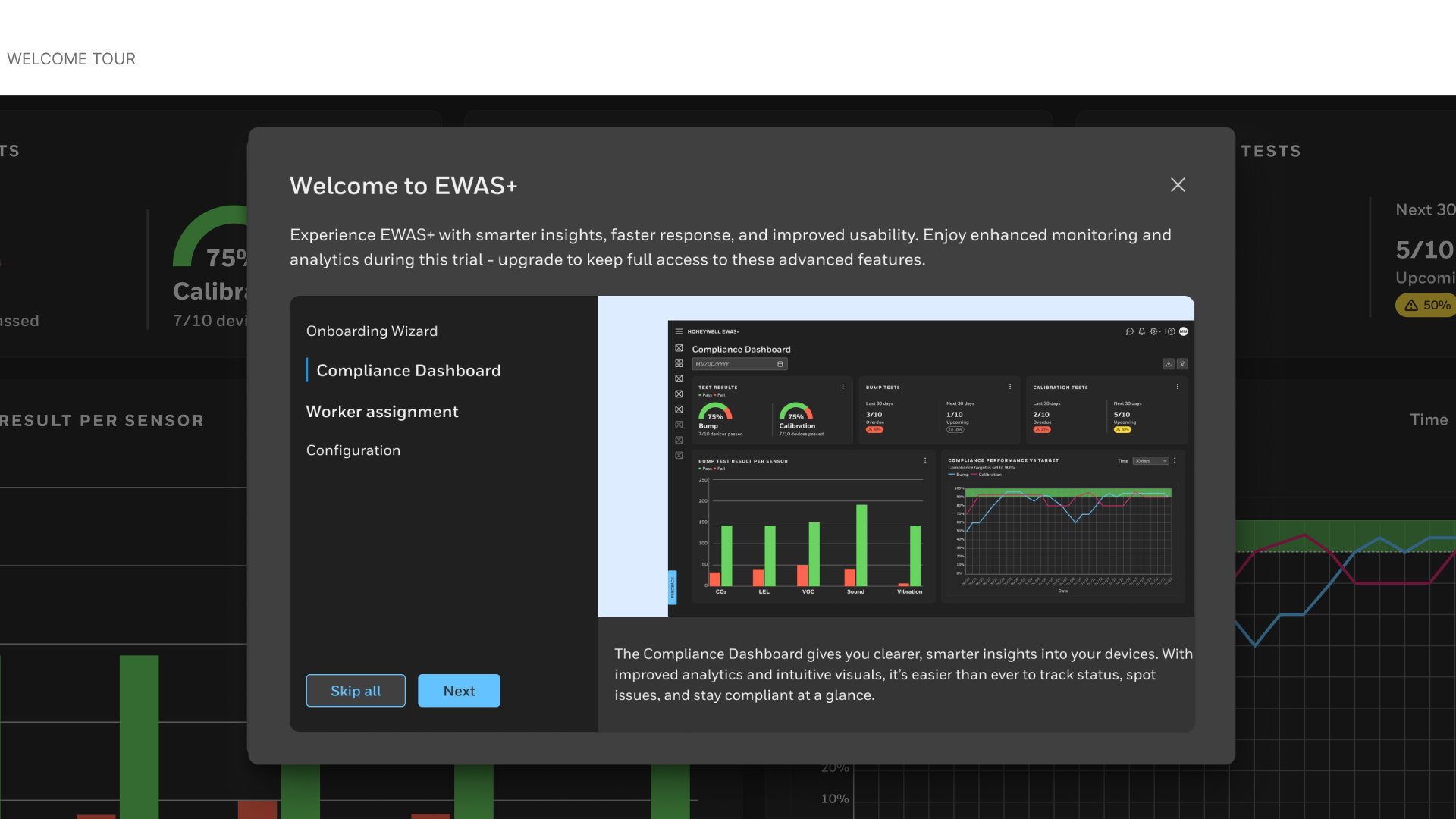
• Interactive onboarding tour: Contextual help and guided walkthroughs reduce training time for new users
• Pre-qualification flow: Users answer short setup questions, such as site type, worker roles, real-time needs, to generate a tailored setup sequence.
• Smart connection detection: Automatically recommends the best connection type (gateway, mobile, or wired).
• AI-guided troubleshooting: Provides instant feedback when a connection fails — suggesting likely fixes and tutorials.
• Interactive onboarding tour: Contextual help and guided walkthroughs reduce training time for new users
Fleet & Asset Management Redesign
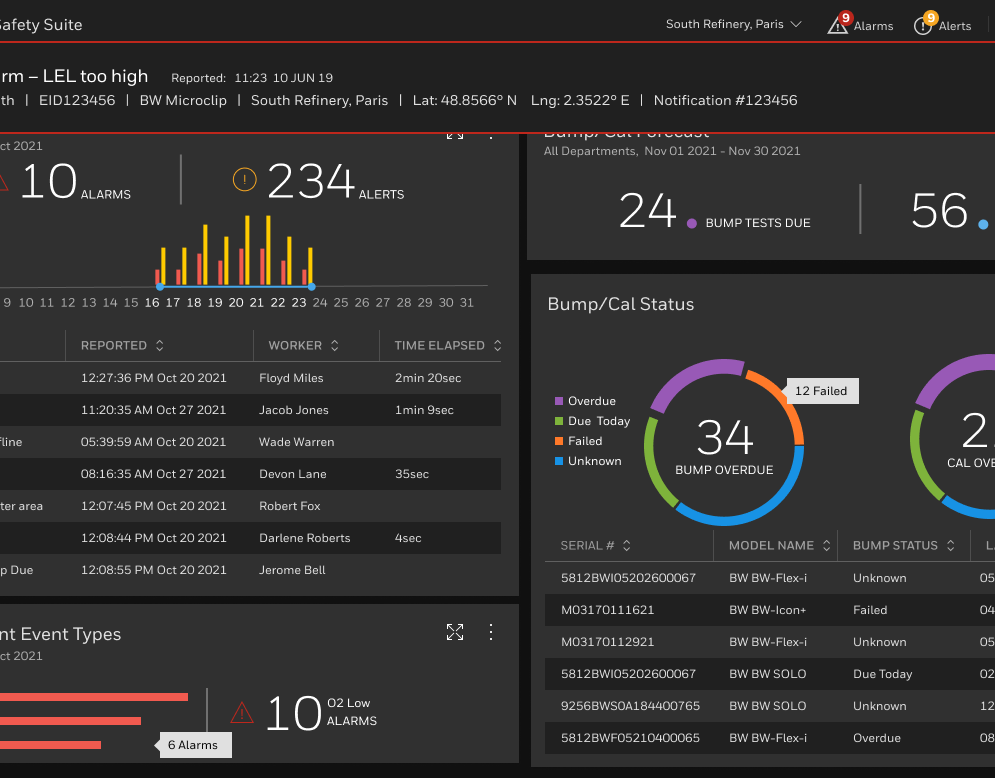
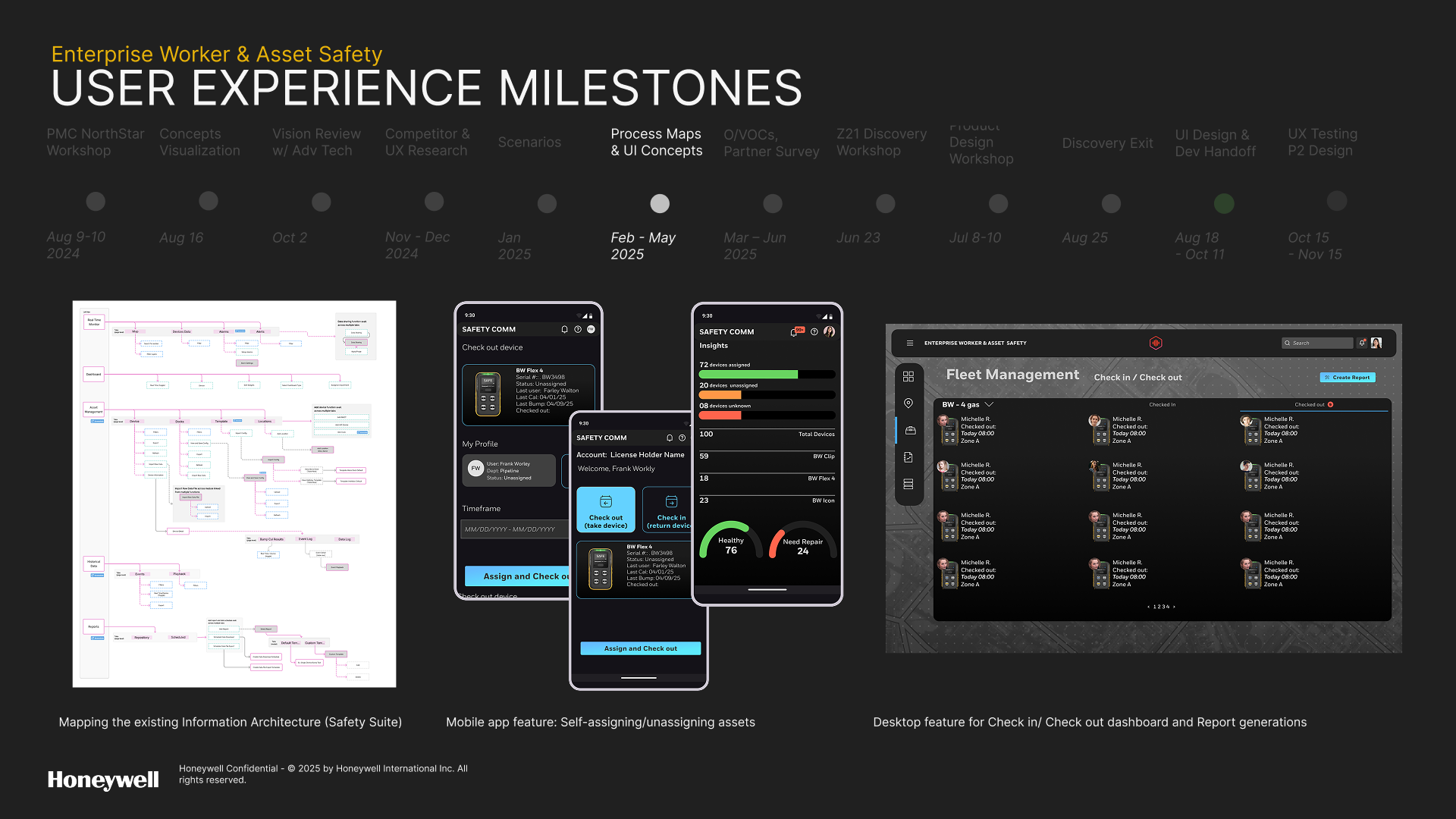
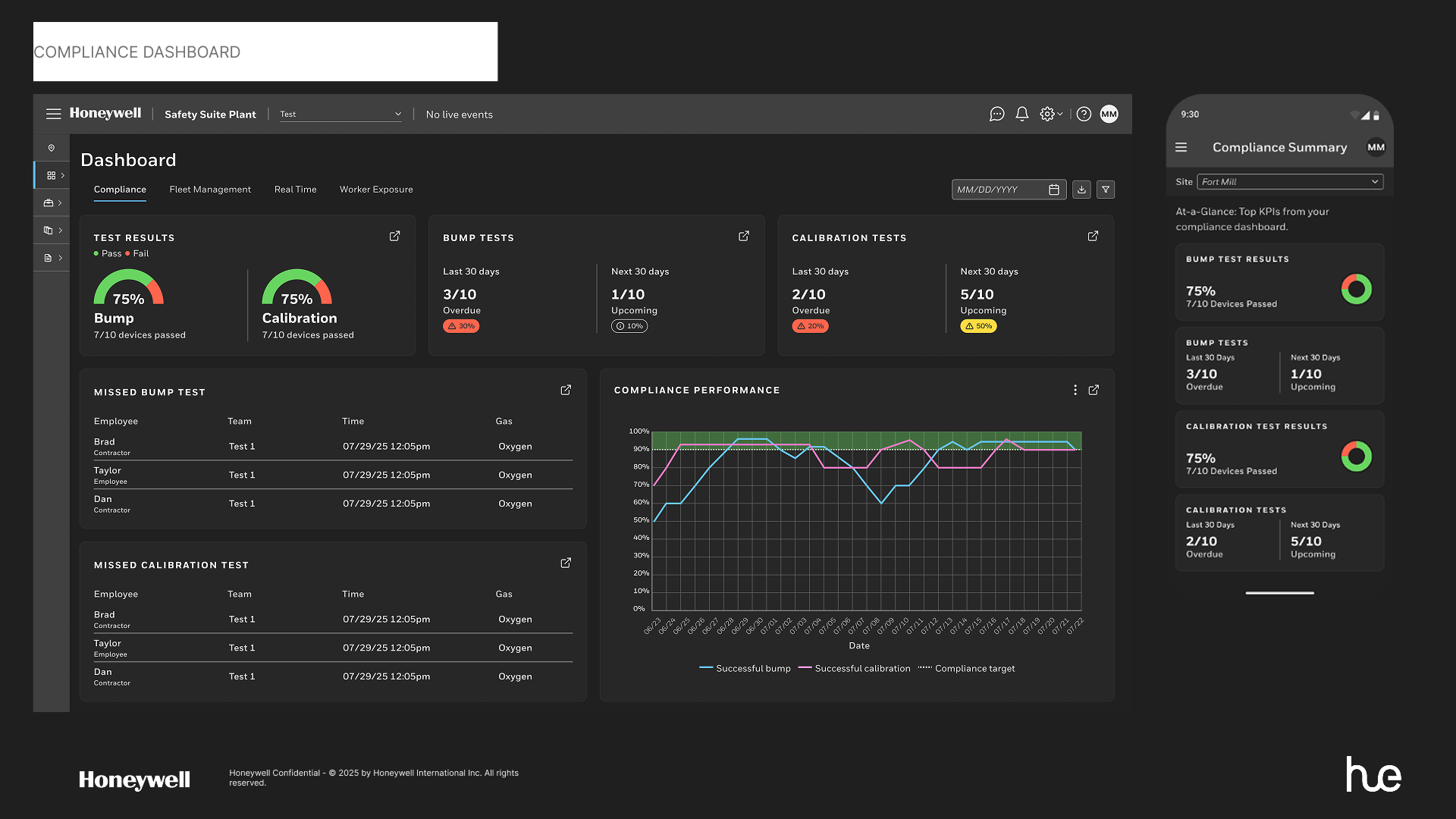
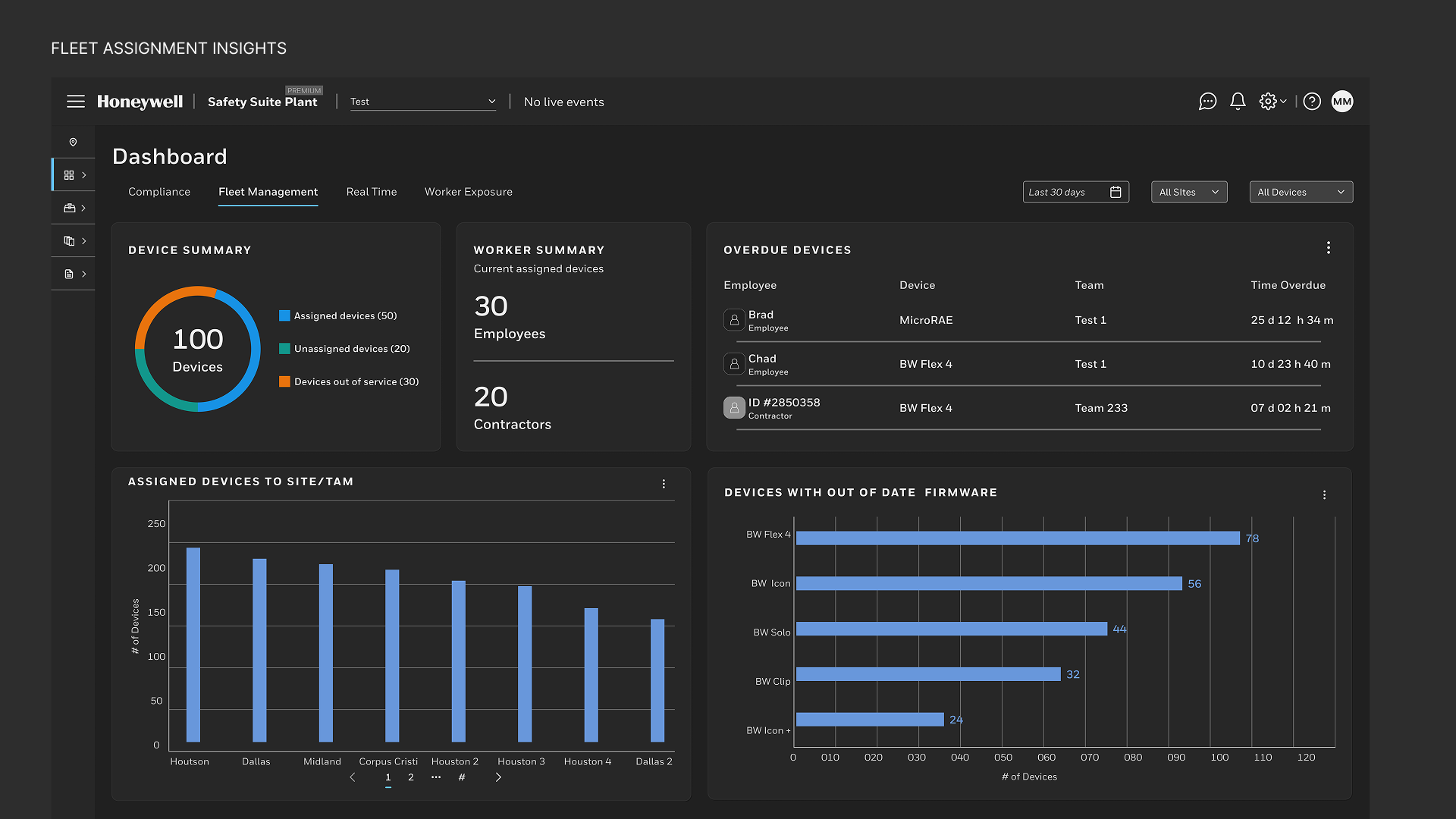
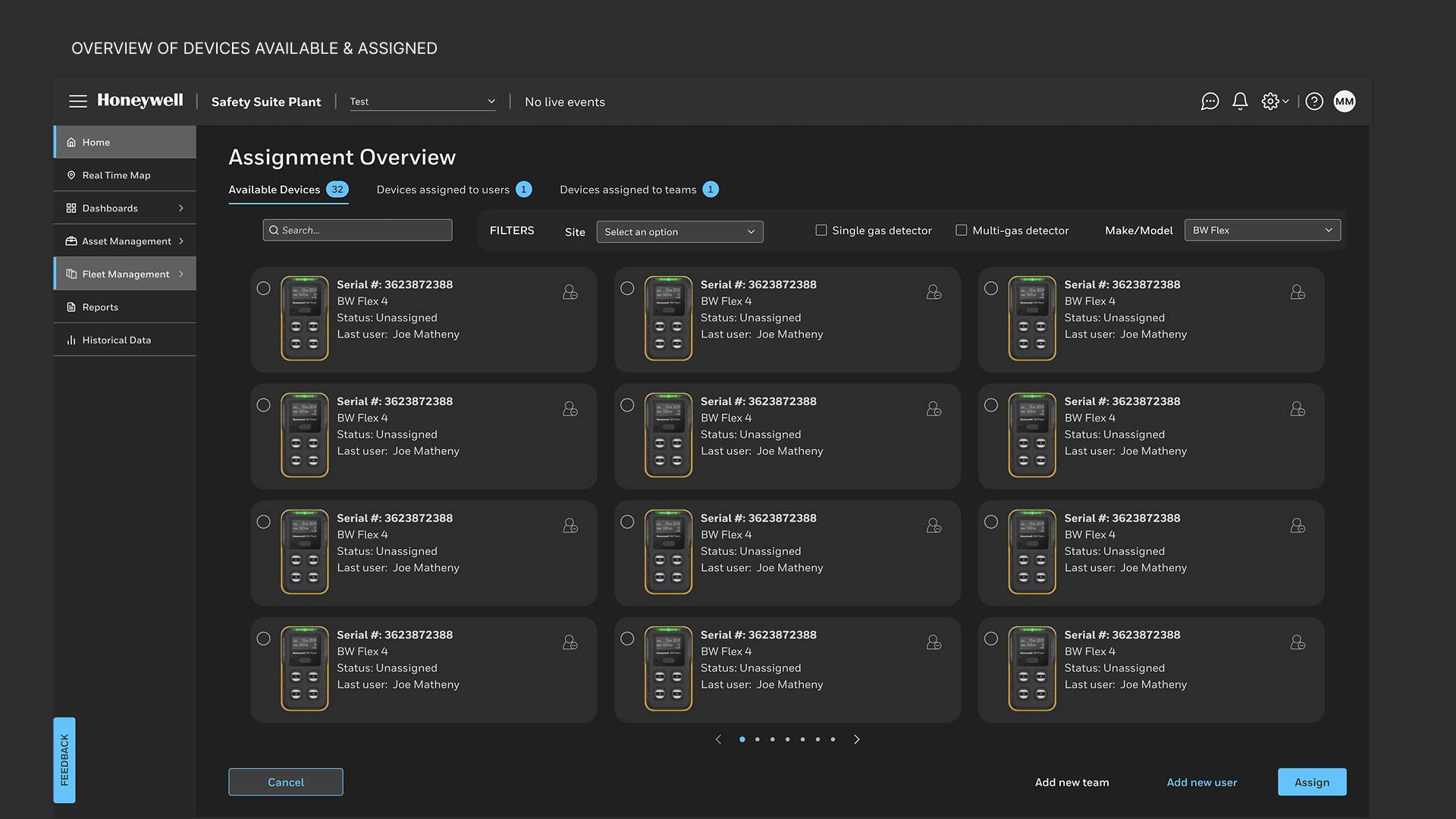
We rebuilt the Fleet Management dashboard with real-time visibility displaying:
• Device status, calibration health, and battery life
• Worker assignments and site locations
• License management and compliance summaries
• Device status, calibration health, and battery life
• Worker assignments and site locations
• License management and compliance summaries
The dashboard leverages Honeywell Forge 2.0 components for data consistency and performance, blending cloud analytics with edge intelligence for low-latency insights.
AI in the Experience
Artificial Intelligence served both as a design partner and a product capability.
MS Copilot Notebooks and Miro AI to accelerate ideation
• Upload documentation and presentation to a custom notebook that served as a research assistant
• Synthesized data points in Miro from all sources including VOC, field notes, and app reviews
• Explored edge-case scenarios with Honeywell's LLM trained on internal data including support tickets, then validated scenarios with firmware and product SMEs
• Upload documentation and presentation to a custom notebook that served as a research assistant
• Synthesized data points in Miro from all sources including VOC, field notes, and app reviews
• Explored edge-case scenarios with Honeywell's LLM trained on internal data including support tickets, then validated scenarios with firmware and product SMEs
Artificial Intelligence in the product
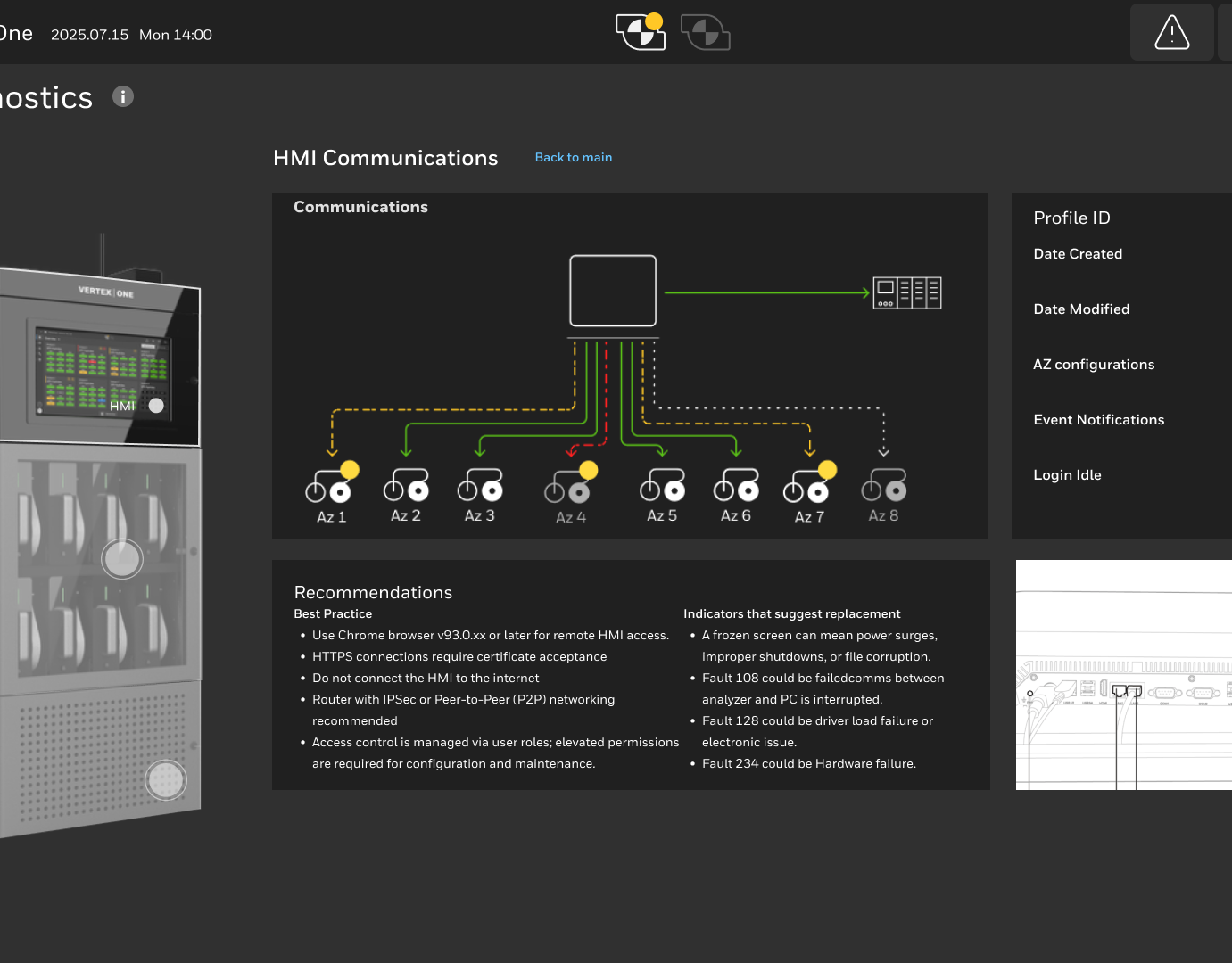
• Maintenance Assist: Context-aware AI that explains setup errors, recommends configuration sequences, and assists in troubleshooting.
• Predictive Analytics: AI models predict hazardous situations by analyzing data logs from devices and external environmental factors
• Behavioral AI: Worker training and compliance data (device bump tests and calibrations) analyzed by AI to determine and predict likelihood of injury
• Maintenance Assist: Context-aware AI that explains setup errors, recommends configuration sequences, and assists in troubleshooting.
• Predictive Analytics: AI models predict hazardous situations by analyzing data logs from devices and external environmental factors
• Behavioral AI: Worker training and compliance data (device bump tests and calibrations) analyzed by AI to determine and predict likelihood of injury
NFC / QR Innovation
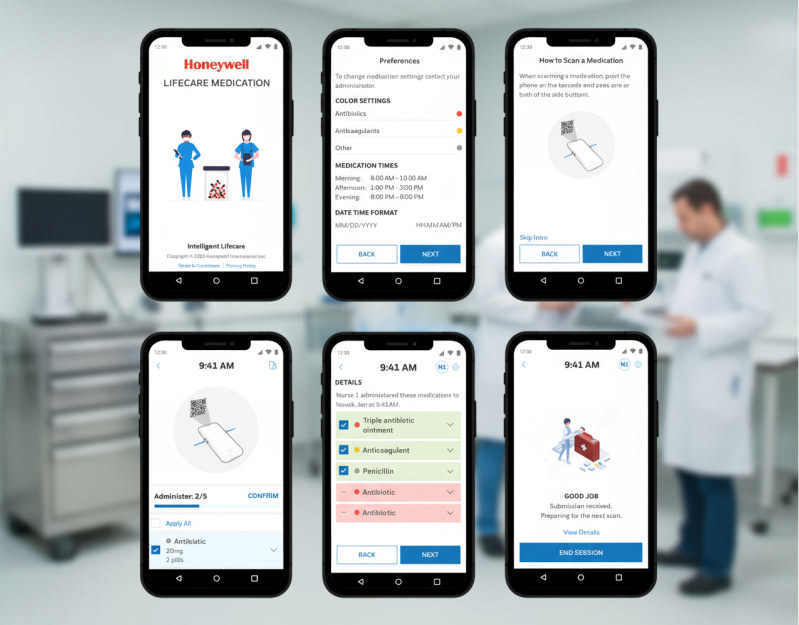
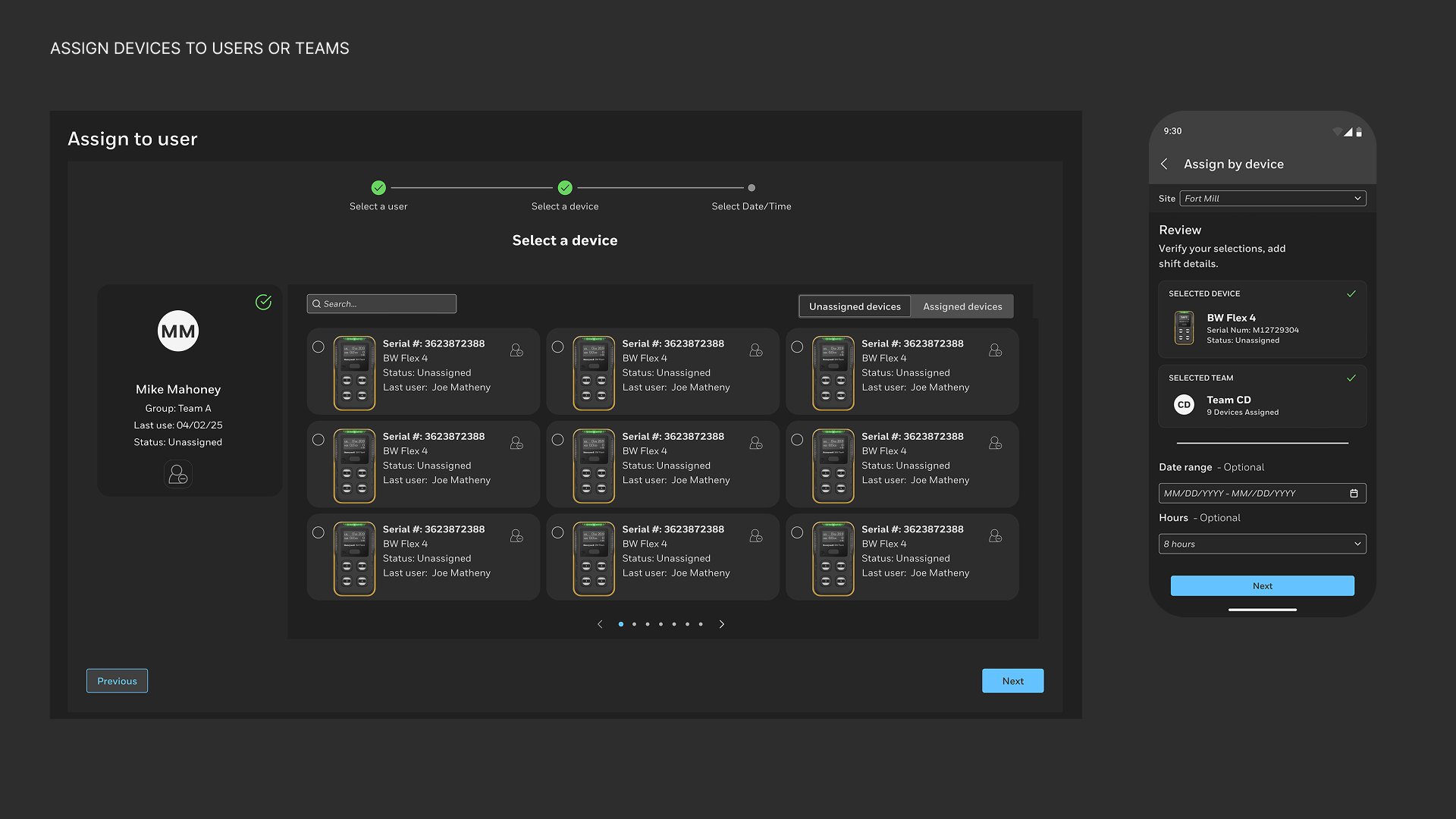
A key competitive differentiator was introducing NFC and QR-based device assignment.
How it Works
• Workers tap or scan a detector to instantly assign it before a shift.
• Auto check-in/out updates worker-device pairing in real time.
• The system syncs with cloud fleet management even when offline.
• Workers tap or scan a detector to instantly assign it before a shift.
• Auto check-in/out updates worker-device pairing in real time.
• The system syncs with cloud fleet management even when offline.
Benefits
• Eliminated manual entry errors
• Improved accountability
• Simplified shift handoffs
• Strengthened compliance traceability
• Eliminated manual entry errors
• Improved accountability
• Simplified shift handoffs
• Strengthened compliance traceability
Design System & Dashboards
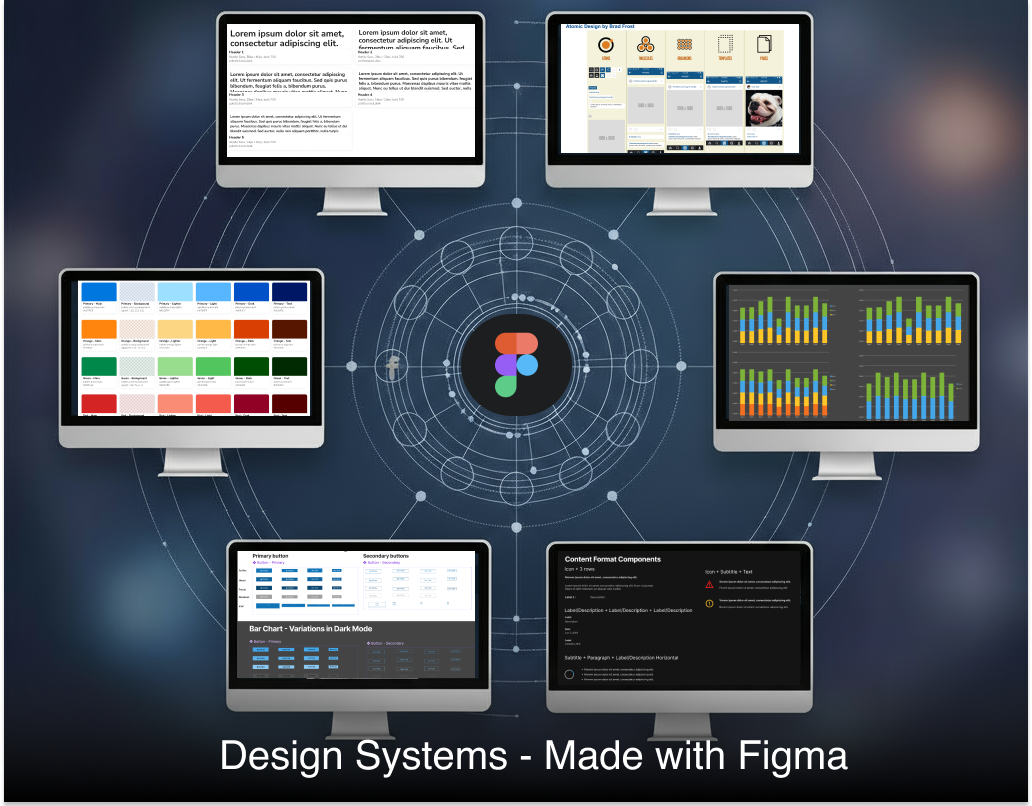
We implemented the Honeywell Forge 2.0 Design System for visual and interaction consistency:
• Modular cards and analytics widgets
• Accessible color palette and high-contrast data visuals
• Scalable layouts for desktop and mobile
• Health and compliance dashboards for worker, fleet, and asset insights
• Modular cards and analytics widgets
• Accessible color palette and high-contrast data visuals
• Scalable layouts for desktop and mobile
• Health and compliance dashboards for worker, fleet, and asset insights
Reflection
This project taught me that AI in industrial design isn’t about automation — it’s about augmentation.
By merging research, empathy, and intelligent systems, we created a more human, transparent, and scalable way for teams to stay safe and productive.
By merging research, empathy, and intelligent systems, we created a more human, transparent, and scalable way for teams to stay safe and productive.
Next Steps
• Integrate Maintenance Assist directly into Forge
• Expand NFC/QR to fixed detection devices
• Launch AI-driven compliance reports and predictive maintenance modules
• Integrate Maintenance Assist directly into Forge
• Expand NFC/QR to fixed detection devices
• Launch AI-driven compliance reports and predictive maintenance modules